
My aicore stack
The most questions I got on my last post was how my tech stack exactly looked like for me to use Claude Code whenever inspiration strikes:
-
Raspberry Pi 5 with 8GB of RAM, 1TB SSD in my living room (about 80€)
-
Running raspberry OS (a variant of Ubuntu)
-
Tmux for persistent terminal sessions
-
Neovim for editing (if I need to) using the lazyvim plugin "distro"
-
Tailscale for access from my other devices
-
Mosh instead of ssh for more reliable remote shell connection. Blink app on iOS for access (costs $20 per year)
-
Wildcard subdomains and reverse proxy by caddy, manages by my dev-router tool for easier access to dev servers and https in prod
-
Mkcert for dev certificates
Let me go through these one by one!
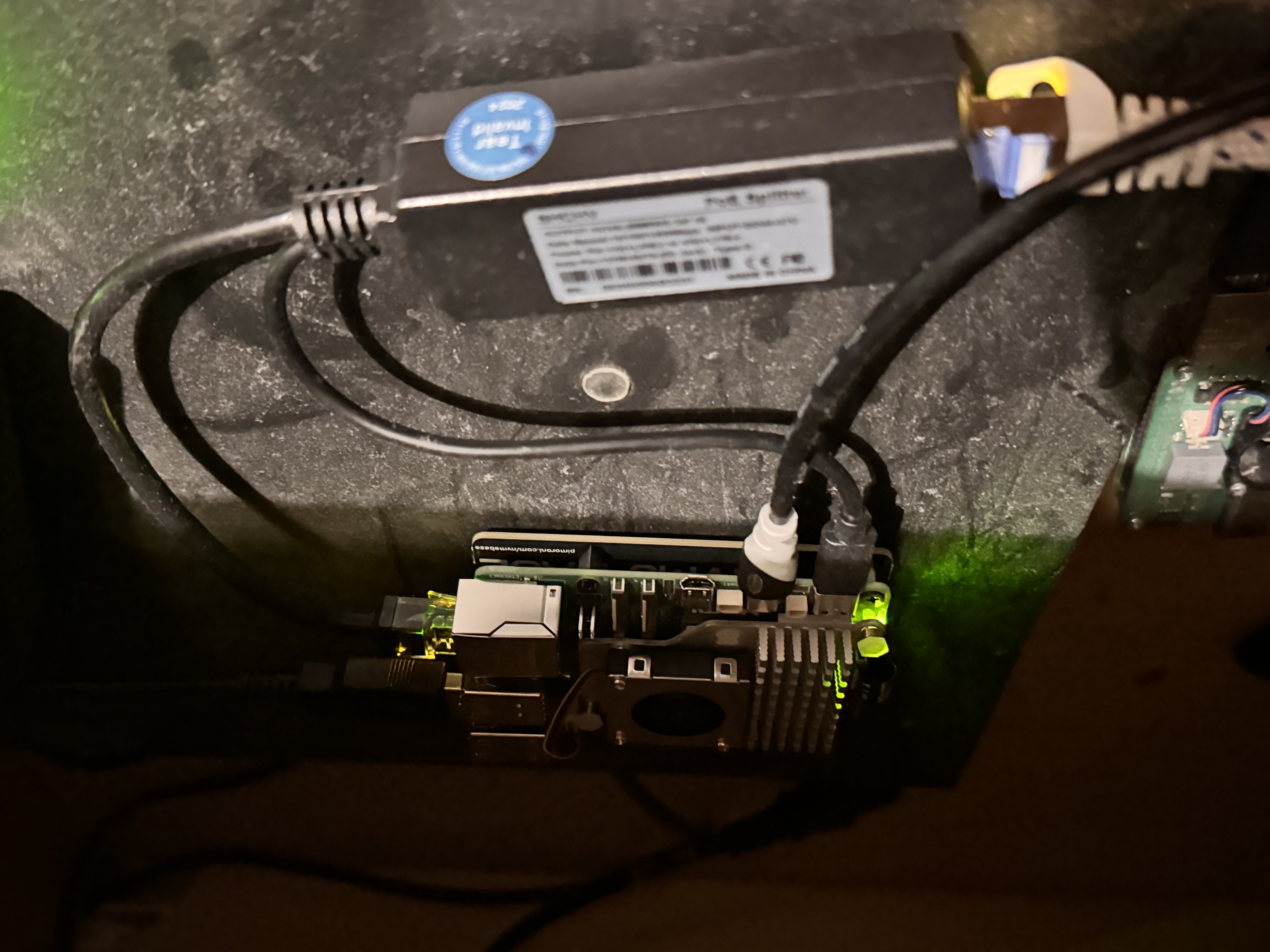
(Cover image: my actual raspberry pi 5 with a PoE power bridge, and a micro-HDMI cable connected because I was debugging something. The ahem very dusty box is my Xbox One X (not being used since I got my Xbox One X), and you see a corner of my raspberry pi 4 on the left)
The Core
Raspberry pi 5 as the main dev server. I used to develop on my laptop, but the issue is I then need my laptop. If I'm outside, I'd need to access my laptop. In principle you could probably also set up your laptop for remote access, but then you need to have it always on. The raspberry pi 5 turns out to be more than fast enough, has enough RAM to run Claude Code, docker, dev services, a database, and an editor. Did you know that it's binary compatible to the Apple Silicon processors? It also only costs about 80€. The Pi 5 has a PCIe interface and can be connected to a SSD drive. Getting a machine like this as a virtual private server on the cloud, with that many cores, memory and disk would cost you 50€ or more per month.
Access
Now the Pi in your living room can talk to the Internet, but unless you try poking holes into your router and do some dynamic DNS stuff, you cannot connect from the outside. Tailscale is a VPN like product that's free for small use cases and really easy to configure. You install a service or an app on all devices that should be able to connect to each other. Now you can connect to the device from your phone using a fixed IP address or a name! For connections, don't use ssh, use mosh. Mosh is like ssh, but uses UDP, which means no persistent connections, and your ssh connection doesn't die when you loose coverage, the phone goes to sleep, or you switch networks. The final piece is tmux, which allows you to have persistent sessions (switch from phone to laptop and back) and also manages multiple sessions with multiple windows.
As you're in the terminal, I use Claude Code on the command line, and neovim (esp. lazyvim) if I need to see code or edit files. Lazyvim is like a distro of plugins for neovim which gives you an IDE like experience, but running in a terminal. Neovim is a reimplementation of vim. While vim doesn't cure carpal tunnel syndrome, but people say it reduces strain because you have to type fewer "chords" (Like Shift-Ctrl-X Ctrl-P). It's fun. There's a ton of videos and guides, but honestly, I learned most of my vim skills from Google Gemini 😅
The final piece: accessing dev servers and https
Now at this point, you have everything to get going. You connect via mosh from your laptop or your phone. You talk to Claude Code, start the dev servers there, they reload automatically and you can immediately see the impact (assuming you're mostly building websites) by connecting to the right port.
There were two things that prompted me to tweak this further: there are some features in browsers that require a https connection (like speech-to-text). And the password manager doesn't distinguish between different ports, so unless you're super consistent, you end up mixing up passwords.
The solution is to point a subdomain at your dev server's tailscale IP and set up a reverse proxy that maps subdomains to ports (like you point *.dev.myawesomedomain.com to your private tailscale IP, and then map different subdomains to different ports.) Because the IP is local to the tailscale network, it can only be accessed from your devices, although the name is public.
As reverse proxy, I'm using caddy that does the https handling automatically, no configuration needed (meaning that you run a http server, but caddy puts a https layer around it). Since the IP is private, caddy cannot do the usual negotiation with letsencrypt, so I'm using mkcert to create local certificates. These are automatically installed on the device where you created them, but need to be installed in your devices (like phones). But then no "untrusted certificate" messages anymore.
For managing the reverse proxies, I wrote a small tool called dev-router, that looks for git repos in a configurable path like ~/Projects, and takes the configuration from dev.yaml file in that folder. Adding a new project server means deciding on a port, setting up dev.yaml and regenerate and reload the reverse proxy.
aicore foundation: complete!
Hope this helps! If I would do it again, I'd probably go for a Pi with 16GB. I ran into issues because I had a number of Claude Code instances open, and wasn't aware each of them consumed a couple hundred MB. The Pi ran out of memory, started to become really slow. It took a minute to start htop, and then I saw that the load was 110! But it didn't die, I managed to kill a couple of processes and eventually it recovered 😅
There is more stuff if you also want to deploy your services to the Internet. I have a VM that runs all my blogs (like this one) and a couple of small demos, and it exposes a webhook endpoint where I can point github and on every commit to the main branch it runs whatever is specified in a webhook.sh file in the folder, so that you can tell Claude to "commit and push" and a minute later your updates are deployed to the Internet.
The real irony is that this setup combines like the smallest practical unit of compute (raspberry pi, 4 cores, ARM, 8GB) talking to some of the largest unit of compute (Anthropic's cloud, probably multi GPU servers with hundreds of GB of VRAM) that exist right now. But it works :)
Let me know how this works for you, or what you tweaked differently!

(POV three Claudes running in parallel)